Experience greytHR mobile app in multiple languages
Updated in June - 2026 | Subscribe to watch greytHR how-to video
The greytHR Mobile app now supports multiple languages to improve usability and adoption. This initiative is the first step toward a global-friendly mobile experience in greytHR. Employees can choose from languages such as English (default), Bahasa, Hindi, Arabic, Kannada, Tamil, Telugu, Gujarati, Marathi, Malayalam, Bengali, and Odia ensuring they can use the app in the language they are most comfortable with.
By combining AI-based translation, external validation, and iterative feedback, the greytHR Mobile app ensures translations are accurate, contextual, and user-friendly.
As an employee, you can use the greytHR Mobile app in your preferred language, making it easier to navigate and complete everyday tasks like applying for leave, checking payslips, or marking attendance.
Enable multi-language in the greytHR Mobile app
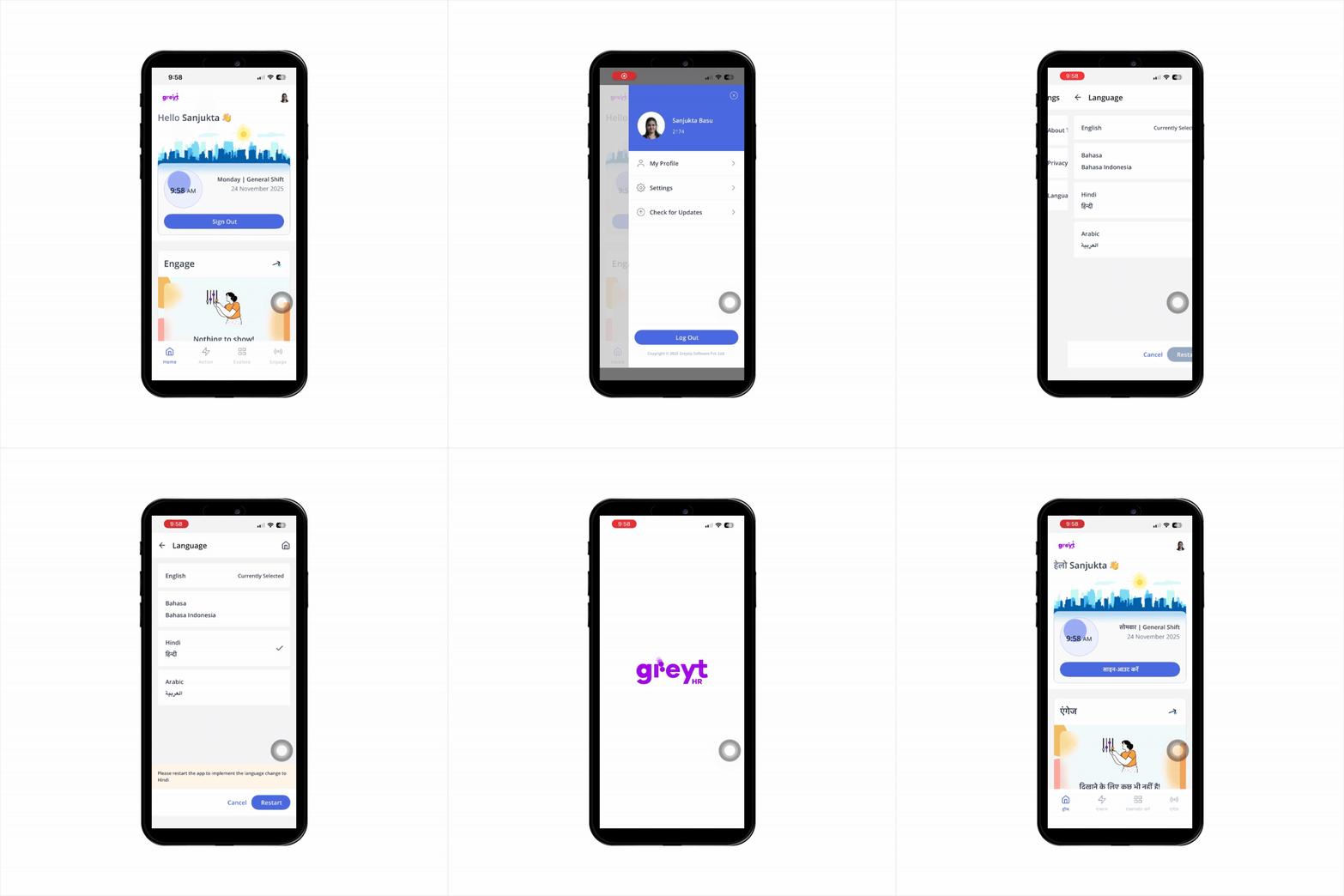
Log in to the greytHR Mobile App.
On the top-right corner of the Home screen, tap your profile picture. A sidebar menu opens.
Tap Settings > Language tab.
Select your preferred language from the available options and click Restart. The app restarts, after which it will switch to the selected language.
Frequently Asked Questions:
Which languages are supported in the greytHR Mobile App?
The app supports multiple languages, including English (default), Bahasa, Hindi, Arabic, Kannada, Tamil, Telugu, Gujarati, Marathi, Malayalam, Bengali and Odia. Employees can select their preferred language in the Language settings.
What are the key benefits of enabling language support in the greytHR Mobile App?
Multi-language support offers:
Localized content for better clarity and relevance.
Enhanced user experience through language preference.
Higher adoption with reduced language barriers.
How do I change the language in the greytHR Mobile app?
Log in to the greytHR Mobile App.
On the top-right corner of the Home screen, tap your profile picture. A sidebar menu opens.
Tap Settings > Language tab.
Select your preferred language from the available options and click Restart. The app restarts, after which it will switch to the selected language.
Will changing the language affect my HR data or settings?
No. Changing the language only updates the app interface. All HR data, settings, and workflows remain unchanged.
Can I switch languages multiple times?
Yes. You can change your preferred language anytime using the Language settings. The currently supported languages are English (default), Bahasa, Hindi, Arabic, Kannada, Tamil, Telugu, Gujarati, Marathi, Malayalam Bengali and Odia.
Are translations accurate for business terms and HR processes?
Yes. Translations are carefully validated using AI tools, native speaker review, and continuous feedback to ensure accuracy and clarity.
Do all features work in every language?
Yes. All app features, including leave requests, attendance marking, payslip access, and approvals, work seamlessly across all supported language.
Related Article:
Was this article helpful?
More resources:
▶ Video - Watch our how-to videos to learn more about greytHR.